질문 : Bump map 의 Bump Filter 란?
답 : Bump Filter 는 screen space 에 적용되는 필터로 1.0 보다 크면 smooth 해지고
1.0 보다 작으면 sharp 해진다.
레퍼런스 : 마야 Help > User Guide > Rendering and Render Setup > Shading > Shading Nodes > Maya Render Nodes > Utilities > Bump 2d

Tuesday, April 26, 2011

Mental Ray의 displacement map Approximation 방식(parametric, spatial 등)의 차이는?
질문 : Mental Ray의 displacement map Approximation 방식(parametric, spatial 등)의 차이는 무엇인가?
답 : 다음 레퍼런스에 잘 설명되어 있다
레퍼런스 : mental ray for maya - Approximations
미러 : Mental Ray에서 displacement map Approximation option-parametric, spatial
답 : 다음 레퍼런스에 잘 설명되어 있다
레퍼런스 : mental ray for maya - Approximations
미러 : Mental Ray에서 displacement map Approximation option-parametric, spatial
Color Management
Color Management 의 필요성
device-independent color space 란 Working Space 라고 하며 예를 들어
포토샵에서 이미지 파일을 에디트할 때 사용되는 컬러 스페이스가 바로
Working Space 이다. sRGB, Adobe RGB (Adobe 98) 가 가장 많이 쓰인다.
어떤 문헌에
device-independent color space 이기 때문이다
Color management & Device profile
Color managed system 의 3요소를 다시 써보면
예를 들면 영화 필름의 프리뷰에서는 3D LUTs 를 사용한다
그러면 포토샵의 Edit > Color Settings 를 알아보자
결국 지금까지의 모든 것이 이를 이해하기 위해서이다
Photoshop 의 Edit > Color Settings 에서 지정해줄 수 있는 것은 크게 두가지이다
Color Management 라는 것이 필요한 이유는 다음과 같다말하자면 Color Management 의 목적은 다음과 같다
Color is device dependent즉 컬러라는 것은 그것을 보여주는 디바이스의 특성에서 자유롭지 못하다
심지어 우리가 보면서 작업하는 모니터도 device dependent 한 컬러라는 한계가 있다
따라서 모니터가 되도록 정확한 색을 내도록 만드는 조정 작업은 물론
컴퓨터로 만든 컬러 데이터가 결과물(영화 필름, 인쇄물 등)로 만들어질때
정확한 컬러로 옮겨지게 하는 것이 중요하다
- 각 디바이스가 최대한 정확한 컬러를 표시하는 것
- 각 디바이스 간에 컬러를 정확히 옮기는 것
1. A device-independent color space 디바이스에 독립적인 컬러스페이스Working Space
2. ICC profiles for each device 즉 각 디바이스의 컬러 특성 데이터
3. A Color Matching Module (CMM) 즉 번역기
device-independent color space 란 Working Space 라고 하며 예를 들어
포토샵에서 이미지 파일을 에디트할 때 사용되는 컬러 스페이스가 바로
Working Space 이다. sRGB, Adobe RGB (Adobe 98) 가 가장 많이 쓰인다.
어떤 문헌에
Consumer class film and flatbed scanner applications have been이렇게 써져 있는데, 그 이유는 sRGB 가 Working Space 즉
ICC aware for some time now, with the vendors usually choosing
sRGB as their preferred color space, which is a bit of a misnomer
because sRGB is not a device color space.
device-independent color space 이기 때문이다
Color management & Device profile
Color managed system 의 3요소를 다시 써보면
1. 디바이스에 독립적인 컬러 스페이스 (Working space)Device profile 에는 두가지가 있다.
2. 디바이스에 dependent 한 컬러 스페이스 (각 디바이스의 ICC profiles)
3. 1과 2를 번역해주는 모듈
- Input profile : 디지털 카메라, 스캐너
- Output profile : 모니터, 프린터, film recorder
예를 들면 영화 필름의 프리뷰에서는 3D LUTs 를 사용한다
In the film industry, 3D LUTs (lookup tables) are used to calculate preview colorsProof Colors
for a monitor or digital projector of how an image will be reproduced on the final film print.
(출처 : http://en.wikipedia.org/wiki/Color_management, http://en.wikipedia.org/wiki/3D_LUT)
Proof Colors 라는 것은 쉽게 말해 최종 출력될 색상을 프리뷰해보는 기능이다Color Settings
포샵 작업은 컴퓨터 모니터를 보며 하지만 결국 그것은 어딘가로 출력하기 위해 작업하는 것이다
최종 결과물의 색상이 원치않는 색이 된다면 작업이 무의미할 것이다
중요한 기능이므로 Command(Ctrl) + Y 라는 단축키가 지정되어 있다
Proof Colors 로 무엇을 프리뷰할 것인가는 View > Proof Setup 메뉴에서 정해줄 수 있는데
디폴트로는 인쇄물 즉 CMYK 로 지정되어 있다
Ctrl + Y 를 누를 때 CMYK 모드가 되는 것은 그 이유에서이다
당연하지만 모니터가 좋지 않으면 정확한 색을 프리뷰할 수 없다
좋은 모니터를 산 후 제대로 calibrate 해야만 정확한 color 작업이 가능하다
그러면 포토샵의 Edit > Color Settings 를 알아보자
결국 지금까지의 모든 것이 이를 이해하기 위해서이다
Photoshop 의 Edit > Color Settings 에서 지정해줄 수 있는 것은 크게 두가지이다
1. Working Spaces : 포샵 작업은 어떤 Working space 상에서 할 것인가검색어 :
2. Color Management Policies :
working space 와 file 의 embeded 의 컬러스페이스가 다를 경우 어떻게 할 것인가
→ working space 로 변환하는 방법과 embeded 컬러 스페이스를 쓰는 방법 두가지가 있다
google > photoshop color profile레퍼런스 :
google > embedded color profile
http://en.wikipedia.org/wiki/Color_management미러 : Color Management, ICC profile, Adobe 98, sRGB, Proof Colors
Photoshop CS3 Colour Management Primer
http://www.computer-darkroom.com/ps10_colour/ps10_1.htm
(미러 : Photoshop Color Management Primer)
Color Management - CambridgeInCoulour Tutorials
http://www.cambridgeincolour.com/tutorials.htm
http://en.wikipedia.org/wiki/3D_LUT
http://en.wikipedia.org/wiki/SRGB
http://en.wikipedia.org/wiki/Color_calibration
Apple Display Calibration Utility
http://www.computer-darkroom.com/colorsync-display/colorsync_1.htm
Monday, April 25, 2011
포토샵의 Overlay Blending Mode 란?
질문 : 포토샵의 Overlay Blending Mode 란?
답 : Multiply 와 Screen 블렌딩모드의 조합으로, 밝은 부분에는 Screen 을, 어두운 부분에는 Multiply 를 쓴 것.
참고 : Multiply 는 A x B, Screen 은 (1-A) x (1-B) 와 같음. 서로 반대인 셈.
레퍼런스 : The Overlay Blending Mode - About Blending Modes in Photoshop and other Graphics Software
답 : Multiply 와 Screen 블렌딩모드의 조합으로, 밝은 부분에는 Screen 을, 어두운 부분에는 Multiply 를 쓴 것.
참고 : Multiply 는 A x B, Screen 은 (1-A) x (1-B) 와 같음. 서로 반대인 셈.
레퍼런스 : The Overlay Blending Mode - About Blending Modes in Photoshop and other Graphics Software
Maya 에서 attribute editor 를 특정 object 에 fix 하려면
질문 : 다른 물체가 선택되어도 attribute editor 는 특정 물체의 것으로 고정시키려면?
답 : attribute editor 에서 Load > Auto Load Selected Attributes 를 체크 끔
답 : attribute editor 에서 Load > Auto Load Selected Attributes 를 체크 끔
ZBrush 의 S.Pivot / C.Pivot
질문 : ZBrush 에서 S.Pivot 과 C.Pivot 이란?
답 : Set Pivot 과 Clear Pivot 으로, Ctrl + Shift drag 로 모델의 일부만 보이게 한 후 보이는 폴리곤들을 중심으로 pivot 을 새로 설정하거나 clear 할때 사용되는 기능. 그런데 사실 모델 위에 Right Button Click 하고 drag 하면 그 점을 중심으로 rotate 하므로 S.Pivot 나 C.Pivot 를 쓸 일은 별로 없음
레퍼런스 : How to fix the pivot of model?????
初めてのZBrush(11)~[Local]と[S.Pivot]~ → 좋은 강좌
답 : Set Pivot 과 Clear Pivot 으로, Ctrl + Shift drag 로 모델의 일부만 보이게 한 후 보이는 폴리곤들을 중심으로 pivot 을 새로 설정하거나 clear 할때 사용되는 기능. 그런데 사실 모델 위에 Right Button Click 하고 drag 하면 그 점을 중심으로 rotate 하므로 S.Pivot 나 C.Pivot 를 쓸 일은 별로 없음
레퍼런스 : How to fix the pivot of model?????
初めてのZBrush(11)~[Local]と[S.Pivot]~ → 좋은 강좌
Sunday, April 24, 2011
projection master 에서 텍스처의 rotation 이 안된다면
질문 : zbrush 의 projection master 에서 texture 를 물체 위에 그려주려 하는데 rotate 할수가 없는데 어떻게 하나
답 : Simple Brush 를 쓰지 말고 Directional Brush 로 바꾸면 잘 된다.
디폴트 브러시인 Simple Brush 상태일 경우 텍스처를 오브젝트 표면에 그려주려 하면
translate, zoom 버튼은 active 한데 rotate 버튼만 inactive 해서 처음에
혼란되기 쉬우므로 주의 요망
인용 : if you use the Directional Brush instead of the Simple Brush you'll be able to rotate
레퍼런스 : Projection Master - Rotate function broken

답 : Simple Brush 를 쓰지 말고 Directional Brush 로 바꾸면 잘 된다.
디폴트 브러시인 Simple Brush 상태일 경우 텍스처를 오브젝트 표면에 그려주려 하면
translate, zoom 버튼은 active 한데 rotate 버튼만 inactive 해서 처음에
혼란되기 쉬우므로 주의 요망
인용 : if you use the Directional Brush instead of the Simple Brush you'll be able to rotate
레퍼런스 : Projection Master - Rotate function broken
ZBrush 에서 Bump map 작업을 하려면
질문 : ZBrush 에 Bump Viewer Material 이 없는데 어디 있나?
답 : Standard Materials 에 보면 BumpViewerMate 라는 것이 있는데 이걸 선택하면 알파맵 적용한 것이 범프맵으로 간주되어 범프를 볼 수 있다. 버전 3.1까지는 Bump Viewer Material 이라는 이름으로 Application dir/ZMaterials/BumpViewerMaterial.zmt 으로 들어 있었는데 버전 4부터는 Standard Materials 에서 바로 볼 수 있음.
레퍼런스 : http://www.pixologic.com/docs/index.php/Painting_Bump_Maps
답 : Standard Materials 에 보면 BumpViewerMate 라는 것이 있는데 이걸 선택하면 알파맵 적용한 것이 범프맵으로 간주되어 범프를 볼 수 있다. 버전 3.1까지는 Bump Viewer Material 이라는 이름으로 Application dir/ZMaterials/BumpViewerMaterial.zmt 으로 들어 있었는데 버전 4부터는 Standard Materials 에서 바로 볼 수 있음.
레퍼런스 : http://www.pixologic.com/docs/index.php/Painting_Bump_Maps
ZBrush 의 Display Properties 란
질문 : ZBrush 의 Display Properties 란?
답 : This subpalette affects the way objects are drawn on the ZBrush canvas. In general, these settings do not affect the models themselves, simply the way they they are drawn in the ZBrush window.
출처 : Tool:Display Properties Subpalette
답 : This subpalette affects the way objects are drawn on the ZBrush canvas. In general, these settings do not affect the models themselves, simply the way they they are drawn in the ZBrush window.
출처 : Tool:Display Properties Subpalette
Saturday, April 23, 2011
ZBrush 4 플러그인들
지브러시 plug-in 들은 하나하나가 모두 유용하므로 사용법을 모두 숙지하는게 좋음
http://www.pixologic.com/zbrush/downloadcenter/zplugins/
ZAppLink, Image Plane, GoZ, UV Master, Blendshapes 등
플러그인 install 방법
ZBrush가 인스톨되어 있는 폴더/ZStartup/ZPlugs
zsc 파일과 데이터 폴더 등 모든 파일을 넣는다
http://www.pixologic.com/zbrush/downloadcenter/zplugins/
ZAppLink, Image Plane, GoZ, UV Master, Blendshapes 등
플러그인 install 방법
ZBrush가 인스톨되어 있는 폴더/ZStartup/ZPlugs
zsc 파일과 데이터 폴더 등 모든 파일을 넣는다
projection master 에서 텍스처가 회색으로 변해서 쓸수가 없다면
질문 : Hi every time i go into projection master, the texture area goes gray and i cant select the texture i need.
답 : Tool 에서 Simple Brush 를 선택해볼 것.
출처 : Texture grays out in projection master
답 : Tool 에서 Simple Brush 를 선택해볼 것.
출처 : Texture grays out in projection master
UV Layout 테스트용 grid texture
질문 : UV Layout 테스트용 grid texture 로 어떤 걸 쓰면 좋을까
답 : google 에서 UV grid tetxure 로 검색해보면 여러가지 나오는데
다음 이미지가 유용
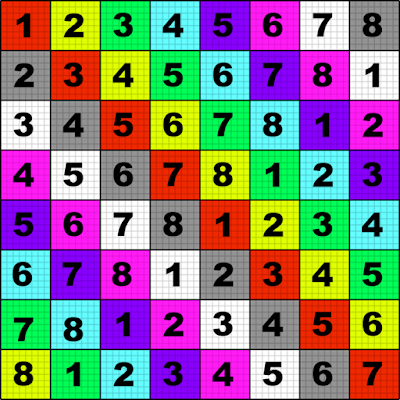
키워드 : util-mark6.png, test
미러 : util-mark6
답 : google 에서 UV grid tetxure 로 검색해보면 여러가지 나오는데
다음 이미지가 유용
키워드 : util-mark6.png, test
미러 : util-mark6
Maya 에서 UV edit 할때 겹치는 부분 표시하려면
질문 : Maya 에서 UV edit 할때 overlapping 하는 부분을 다른 색깔로 표시하려면
답 : UV Editor menu > Image > Shade UVs
답 : UV Editor menu > Image > Shade UVs
Maya 의 manipulator size 조절하려면
질문 : Maya 에서 manipulator 의 사이즈를 크거나 작게 하려면
답 : + / - 핫키를 쓰면 된다
레퍼런스 : Autodesk Maya keyboard shortcuts
키워드 : hotkey, shortcut, widget, 위젯
답 : + / - 핫키를 쓰면 된다
레퍼런스 : Autodesk Maya keyboard shortcuts
키워드 : hotkey, shortcut, widget, 위젯
Friday, April 22, 2011
XMP 란
질문 : XMP 란?
답 : Extensible Metadata Platform 의 약자로, Adobe 가 지정한 specification.
파일에 embed 되는 metadata 규격으로, 예를 들어 사진 파일에 들어가는 날짜와 시간 정보, 카메라의 aperture, shutter speed 등이 들어가는 등으로 쓰인다.
부연 : 사용 파일은 PDF, JPEG, JPEG 2000, GIF, PNG, HTML, TIFF, Adobe Illustrator, PSD, MP3, MP4, Audio Video Interleave, WAV, RF64, Audio Interchange File Format, PostScript, Encapsulated PostScript 등.
레퍼런스 : What is XMP?
http://en.wikipedia.org/wiki/Extensible_Metadata_Platform
답 : Extensible Metadata Platform 의 약자로, Adobe 가 지정한 specification.
파일에 embed 되는 metadata 규격으로, 예를 들어 사진 파일에 들어가는 날짜와 시간 정보, 카메라의 aperture, shutter speed 등이 들어가는 등으로 쓰인다.
부연 : 사용 파일은 PDF, JPEG, JPEG 2000, GIF, PNG, HTML, TIFF, Adobe Illustrator, PSD, MP3, MP4, Audio Video Interleave, WAV, RF64, Audio Interchange File Format, PostScript, Encapsulated PostScript 등.
레퍼런스 : What is XMP?
http://en.wikipedia.org/wiki/Extensible_Metadata_Platform
Thursday, April 21, 2011
포토샵에서 Load channel as selection 하려면
질문 : Load channel as selection 의 핫키
답 : Command-click channel thumbnail
레퍼런스 :
Home / Using Photoshop CS5 / Keyboard shortcuts / Default keyboard shortcuts / Keys for the Channels panel
답 : Command-click channel thumbnail
레퍼런스 :
Home / Using Photoshop CS5 / Keyboard shortcuts / Default keyboard shortcuts / Keys for the Channels panel
Subscribe to:
Posts (Atom)