질문 : How do I draw straight lines?
답 : Hold down the CTRL key (or Command key in Macs) to draw a straight line.
Holding down the SHIFT key will allow you to rotate the direction you draw in, in 15 degree steps.
(holding down SHIFT alone changes the size of the tool, with the pen movement - up to increase size, down to decrease)
출처 : http://www.squidoo.com/artrage-3-tutorials

Showing posts with label ArtRage. Show all posts
Showing posts with label ArtRage. Show all posts
Wednesday, December 7, 2011

Tuesday, November 29, 2011
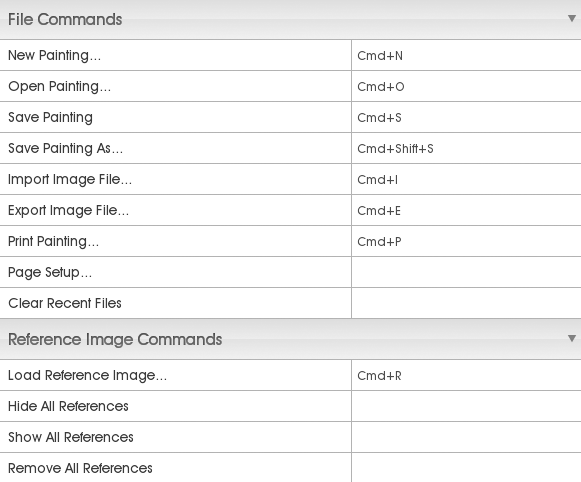
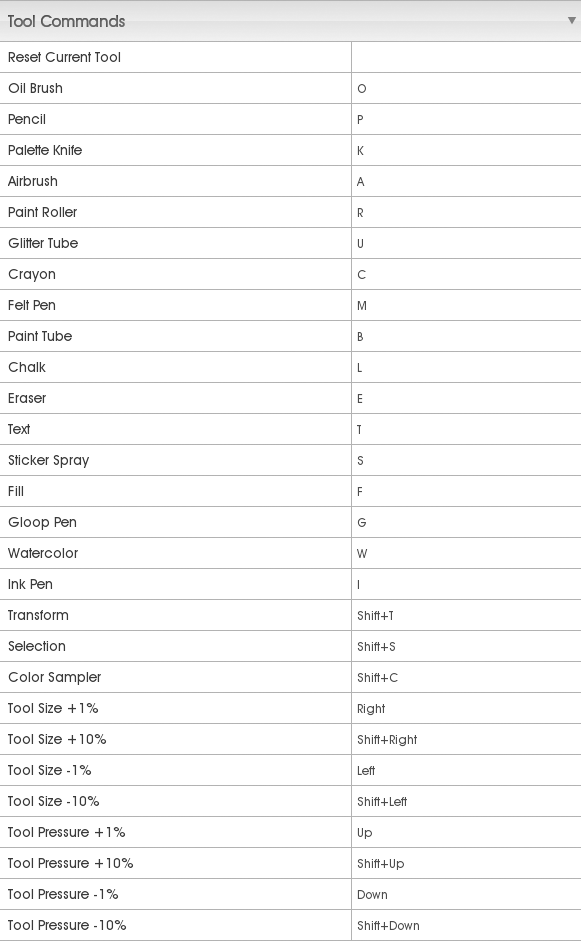
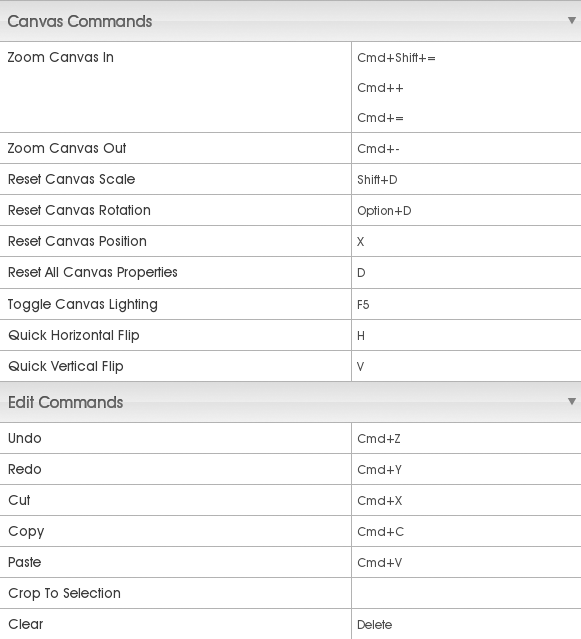
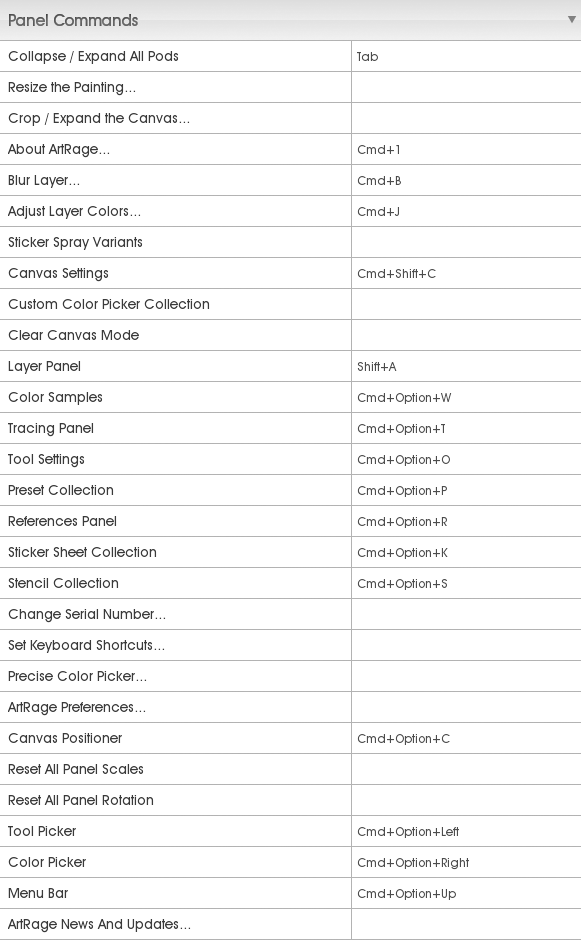
ArtRage hotkeys (All)
참고 : ArtRage hotkeys (Important)
1 File & Reference Image
2 Layer

3 Tool
4 Canvas & Edit
5 Panel
6 Color

7 Tracing & Stencil

8 Selection & Filter

9 Cursor
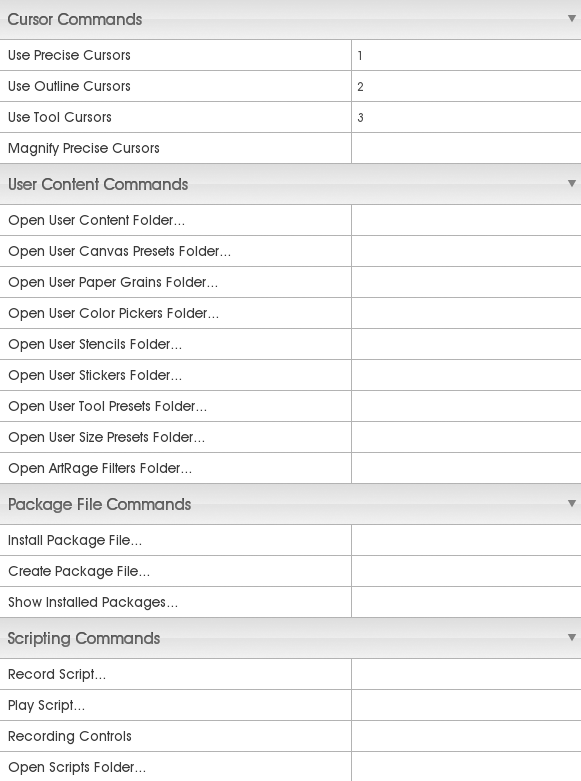
1 File & Reference Image
2 Layer
3 Tool
4 Canvas & Edit
5 Panel
6 Color
7 Tracing & Stencil
8 Selection & Filter
9 Cursor
ArtRage hotkeys (Important)
참조 링크 : ArtRage Hotkeys (All)
Tools
Pencil : P
Watercolor : W
Paint Tube : B
Oil Brush : O
Palette Knife : K
Eraser : E
Crayon : C
Chalk : L
Sticker Spray : S
Ink pen : I
Felt Pen : M
Airbrush : A
Transform/Select
Transform tool : Shift + T
Select tool : Shift + S
Tool/Brush size
Tool Size ± 1% : (←/→)
Tool Size ± 10% : Shift + (←/→)
Tool Pressure ± 1% : (↑/↓)
Tool Pressure ± 10% : Shift + (↑/↓)
Resize brush : Shift + drag LMB
Zoom
Zoom Canvas : Command + "+" / Command + "-"
Canvas
Canvas Rotation : Alt + RMB
Canvas Rotation reset : Alt + D
Canvas Zoom : Shift + drag RMB
Canvas Zoom to 100% : Shift + D
Canvas Panning : drag RMB (포토샵의 space 키와 같은 역할)
Canvas lighting toggle : F5
Reference Image / Tracing
Load Reference Image : Command + R
Load Tracing Image : Command + T
Clear Tracing Image : Command + Shift + T
Show Tracing Image : /
Color
Pick Color : Alt + LMB
레퍼런스 : andrea_bianco-speed_painting_with_artrage-feb2010.pdf
키워드 : Shortcuts
미러 : ArtRage 3.5 Hotkeys.png, ArtRage 3.5 Hotkeys org.png
Tools
Pencil : P
Watercolor : W
Paint Tube : B
Oil Brush : O
Palette Knife : K
Eraser : E
Crayon : C
Chalk : L
Sticker Spray : S
Ink pen : I
Felt Pen : M
Airbrush : A
Transform/Select
Transform tool : Shift + T
Select tool : Shift + S
Tool/Brush size
Tool Size ± 1% : (←/→)
Tool Size ± 10% : Shift + (←/→)
Tool Pressure ± 1% : (↑/↓)
Tool Pressure ± 10% : Shift + (↑/↓)
Resize brush : Shift + drag LMB
Zoom
Zoom Canvas : Command + "+" / Command + "-"
Canvas
Canvas Rotation : Alt + RMB
Canvas Rotation reset : Alt + D
Canvas Zoom : Shift + drag RMB
Canvas Zoom to 100% : Shift + D
Canvas Panning : drag RMB (포토샵의 space 키와 같은 역할)
Canvas lighting toggle : F5
Reference Image / Tracing
Load Reference Image : Command + R
Load Tracing Image : Command + T
Clear Tracing Image : Command + Shift + T
Show Tracing Image : /
Color
Pick Color : Alt + LMB
레퍼런스 : andrea_bianco-speed_painting_with_artrage-feb2010.pdf
키워드 : Shortcuts
미러 : ArtRage 3.5 Hotkeys.png, ArtRage 3.5 Hotkeys org.png
Monday, November 28, 2011
ArtRage 소개
Painter 대용으로 쓰기 좋으면서 매우 가벼운 프로그램
사용법 익히기가 대단히 쉬움
소프트웨어 소개 :
ArtRage is an easy to use, stylish painting package for Windows, Mac OS X, and iPad.
공식 홈페이지
공식 홈페이지 > 데모버전 다운로드
위키피디아 > ArtRage
튜토리얼 :
Artrage Tutorials
사용법 익히기가 대단히 쉬움
소프트웨어 소개 :
ArtRage is an easy to use, stylish painting package for Windows, Mac OS X, and iPad.
공식 홈페이지
공식 홈페이지 > 데모버전 다운로드
위키피디아 > ArtRage
튜토리얼 :
Artrage Tutorials
Subscribe to:
Posts (Atom)