http://coolvibe.com/
http://www.andreasrocha.com/gallery.htm

Wednesday, November 30, 2011

Tuesday, November 29, 2011
ArtRage hotkeys (All)
참고 : ArtRage hotkeys (Important)
1 File & Reference Image
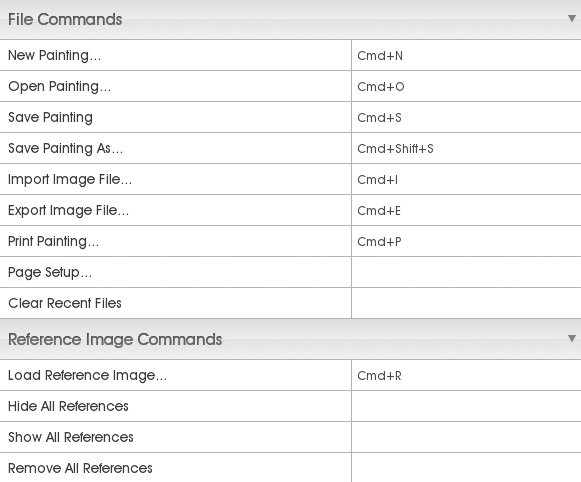
2 Layer

3 Tool
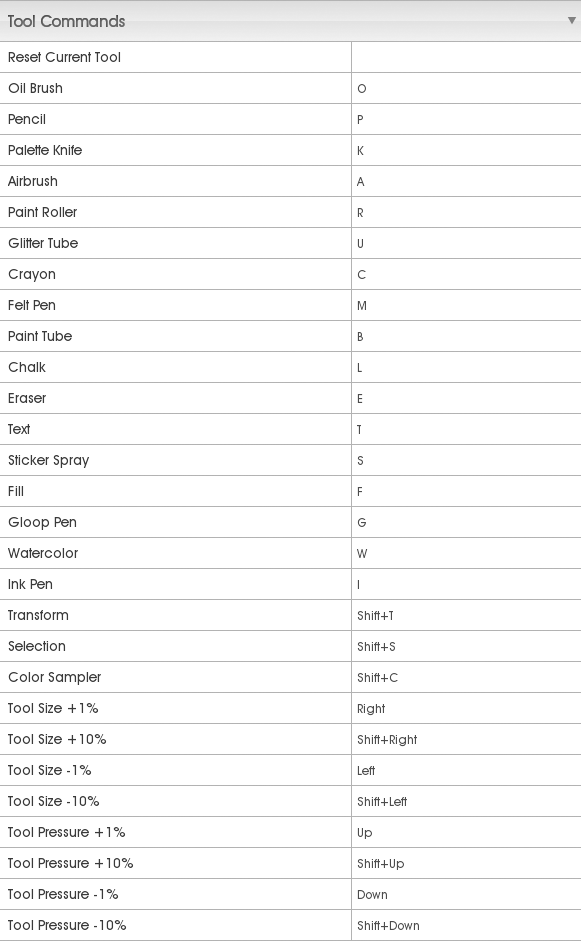
4 Canvas & Edit
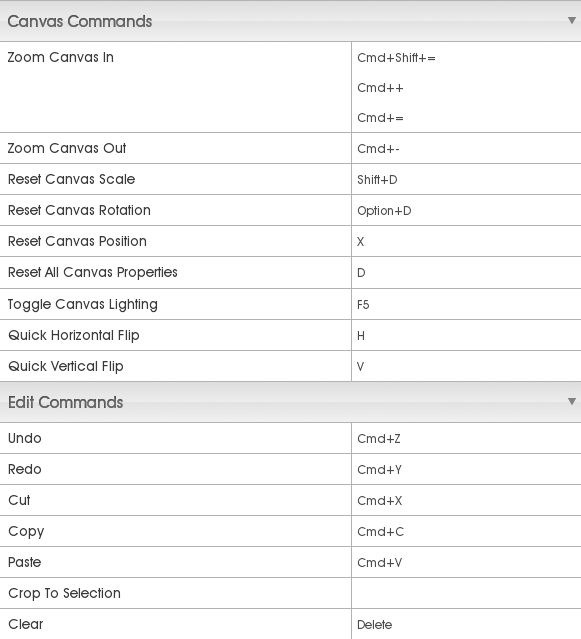
5 Panel
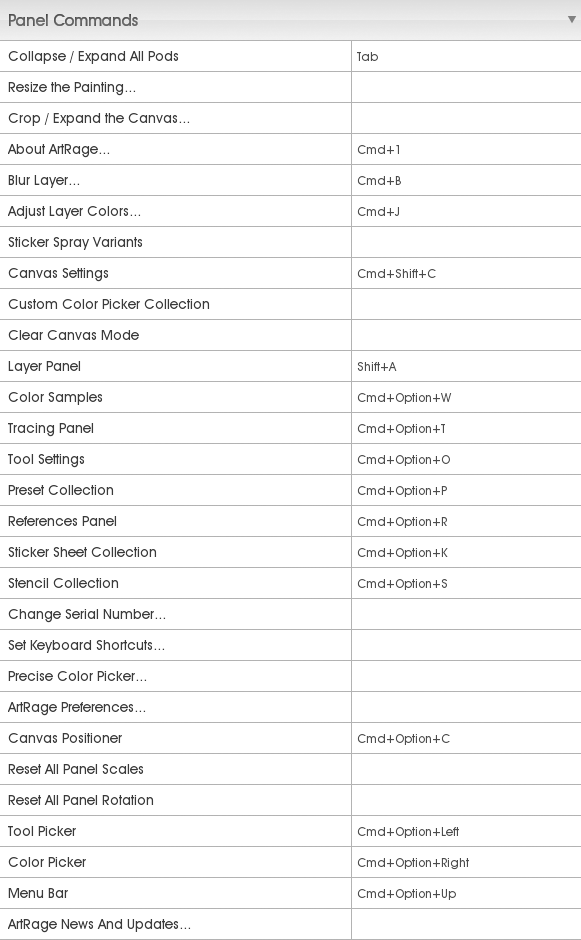
6 Color

7 Tracing & Stencil

8 Selection & Filter

9 Cursor
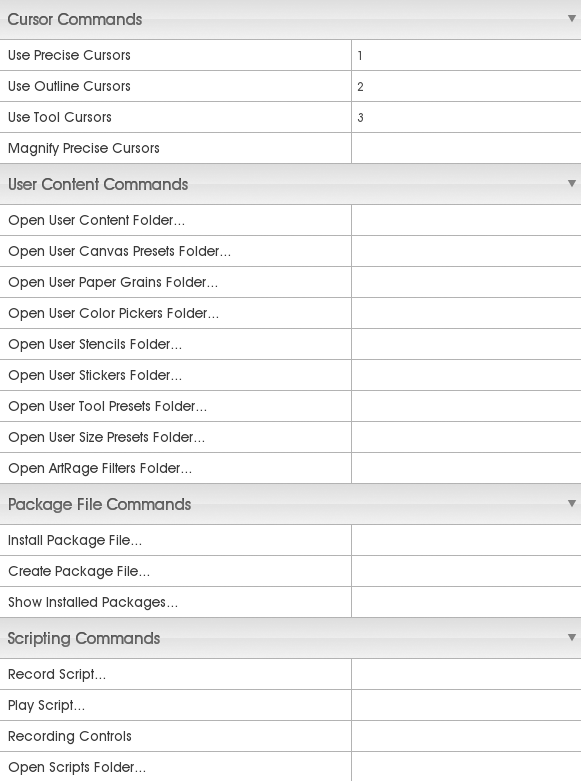
1 File & Reference Image
2 Layer
3 Tool
4 Canvas & Edit
5 Panel
6 Color
7 Tracing & Stencil
8 Selection & Filter
9 Cursor
ArtRage hotkeys (Important)
참조 링크 : ArtRage Hotkeys (All)
Tools
Pencil : P
Watercolor : W
Paint Tube : B
Oil Brush : O
Palette Knife : K
Eraser : E
Crayon : C
Chalk : L
Sticker Spray : S
Ink pen : I
Felt Pen : M
Airbrush : A
Transform/Select
Transform tool : Shift + T
Select tool : Shift + S
Tool/Brush size
Tool Size ± 1% : (←/→)
Tool Size ± 10% : Shift + (←/→)
Tool Pressure ± 1% : (↑/↓)
Tool Pressure ± 10% : Shift + (↑/↓)
Resize brush : Shift + drag LMB
Zoom
Zoom Canvas : Command + "+" / Command + "-"
Canvas
Canvas Rotation : Alt + RMB
Canvas Rotation reset : Alt + D
Canvas Zoom : Shift + drag RMB
Canvas Zoom to 100% : Shift + D
Canvas Panning : drag RMB (포토샵의 space 키와 같은 역할)
Canvas lighting toggle : F5
Reference Image / Tracing
Load Reference Image : Command + R
Load Tracing Image : Command + T
Clear Tracing Image : Command + Shift + T
Show Tracing Image : /
Color
Pick Color : Alt + LMB
레퍼런스 : andrea_bianco-speed_painting_with_artrage-feb2010.pdf
키워드 : Shortcuts
미러 : ArtRage 3.5 Hotkeys.png, ArtRage 3.5 Hotkeys org.png
Tools
Pencil : P
Watercolor : W
Paint Tube : B
Oil Brush : O
Palette Knife : K
Eraser : E
Crayon : C
Chalk : L
Sticker Spray : S
Ink pen : I
Felt Pen : M
Airbrush : A
Transform/Select
Transform tool : Shift + T
Select tool : Shift + S
Tool/Brush size
Tool Size ± 1% : (←/→)
Tool Size ± 10% : Shift + (←/→)
Tool Pressure ± 1% : (↑/↓)
Tool Pressure ± 10% : Shift + (↑/↓)
Resize brush : Shift + drag LMB
Zoom
Zoom Canvas : Command + "+" / Command + "-"
Canvas
Canvas Rotation : Alt + RMB
Canvas Rotation reset : Alt + D
Canvas Zoom : Shift + drag RMB
Canvas Zoom to 100% : Shift + D
Canvas Panning : drag RMB (포토샵의 space 키와 같은 역할)
Canvas lighting toggle : F5
Reference Image / Tracing
Load Reference Image : Command + R
Load Tracing Image : Command + T
Clear Tracing Image : Command + Shift + T
Show Tracing Image : /
Color
Pick Color : Alt + LMB
레퍼런스 : andrea_bianco-speed_painting_with_artrage-feb2010.pdf
키워드 : Shortcuts
미러 : ArtRage 3.5 Hotkeys.png, ArtRage 3.5 Hotkeys org.png
Monday, November 28, 2011
ArtRage 소개
Painter 대용으로 쓰기 좋으면서 매우 가벼운 프로그램
사용법 익히기가 대단히 쉬움
소프트웨어 소개 :
ArtRage is an easy to use, stylish painting package for Windows, Mac OS X, and iPad.
공식 홈페이지
공식 홈페이지 > 데모버전 다운로드
위키피디아 > ArtRage
튜토리얼 :
Artrage Tutorials
사용법 익히기가 대단히 쉬움
소프트웨어 소개 :
ArtRage is an easy to use, stylish painting package for Windows, Mac OS X, and iPad.
공식 홈페이지
공식 홈페이지 > 데모버전 다운로드
위키피디아 > ArtRage
튜토리얼 :
Artrage Tutorials
PaintTool SAI
Paint Tool SAI in English
Paint tool SAI Tutorial (FAST and BASIC for beginners)
인용 :
PaintTool SAI is a lightweight software focused solely on painting and drawing. Because of that, it doesn't include some of the common features that similar software has, such as text layers, gradients and shape tools, and therefore the finalizing touch of drawings is to be made in another program. This is helped by SAI's ability to export the files to other popular formats, like .psd or .bmp, in addition to its .sai-format.
Various raster drawing tools are implemented, such as the Airbrush, Watercolor, Pen and Marker, which can all be easily customized, and stored in slots in the user interface of the application. There is also a set of vector drawing tools intended for inking, which, like the raster tools, can be configured to be pen pressure sensitive. However, the vector tools are not affected by selections, and therefore need to be adjusted by other vector tools.
출처 : trial version 다운로드 링크
Paint tool SAI Tutorial (FAST and BASIC for beginners)
인용 :
PaintTool SAI is a lightweight software focused solely on painting and drawing. Because of that, it doesn't include some of the common features that similar software has, such as text layers, gradients and shape tools, and therefore the finalizing touch of drawings is to be made in another program. This is helped by SAI's ability to export the files to other popular formats, like .psd or .bmp, in addition to its .sai-format.
Various raster drawing tools are implemented, such as the Airbrush, Watercolor, Pen and Marker, which can all be easily customized, and stored in slots in the user interface of the application. There is also a set of vector drawing tools intended for inking, which, like the raster tools, can be configured to be pen pressure sensitive. However, the vector tools are not affected by selections, and therefore need to be adjusted by other vector tools.
출처 : trial version 다운로드 링크
simple 2d animation software
Flipbook
→ 디즈니 애니메이터 Eric Goldberg('알라딘' 등 애니메이션 제작)가 추천한 프로그램
→ 3D 애니메이션 만들 때도 함께 사용하면 좋다고 함
Toon Boom Studio
→ 디즈니 애니메이터 Eric Goldberg('알라딘' 등 애니메이션 제작)가 추천한 프로그램
→ 3D 애니메이션 만들 때도 함께 사용하면 좋다고 함
Toon Boom Studio
Monday, November 14, 2011
제임스 카메론의 영화인생과 작품세계
제임스 카메론의 영화인생과 작품세계 2
재정적 곤란을 겪고 있던 짐은 부업으로 (극장 개봉 없이 곧장 비디오로 출시되는) 싸구려 영화 비디오테이프의 포스터를 그려주는 일을 맡기도 했다. (짐의 그림 그리는 재주는 결국 어떤 방식으로든 그에게 결정적 도움을 주었던 것이다!)
...
아놀드에게는 짐이 그린 그림 한 장이 배달됐다. 그림에는 아래와 같은 이미지가 그려져 있었다...
이 그림을 본 아놀드는 곧장 자신의 에이전트에게 전화를 걸어 터미네이터 역을 맡겠다고 소리쳤다. 그리고 그날 오후, 아놀드의 캐스팅 계약은 정식으로 체결됐다.
키워드 : 터미네이터
재정적 곤란을 겪고 있던 짐은 부업으로 (극장 개봉 없이 곧장 비디오로 출시되는) 싸구려 영화 비디오테이프의 포스터를 그려주는 일을 맡기도 했다. (짐의 그림 그리는 재주는 결국 어떤 방식으로든 그에게 결정적 도움을 주었던 것이다!)
...
아놀드에게는 짐이 그린 그림 한 장이 배달됐다. 그림에는 아래와 같은 이미지가 그려져 있었다...
이 그림을 본 아놀드는 곧장 자신의 에이전트에게 전화를 걸어 터미네이터 역을 맡겠다고 소리쳤다. 그리고 그날 오후, 아놀드의 캐스팅 계약은 정식으로 체결됐다.
키워드 : 터미네이터
Sunday, October 16, 2011
Ableton
Ableton Live
M83, Sasha, Daft Punk 등의 아티스트들이 사용하는 Loop based software
M83
http://ilovem83.com/2011/09/13/musician-required-for-m83-tour/
An opportunity has arisen for a suitable musician to join the forthcoming M83 World Tour which commences in Mexico in October. We are looking for a multi-instrumentalist based in the Los Angeles area who can play Guitar, Bass and Keyboards. They should also be able to sing and ideally have previous knowledge of working with Ableton.
Sasha
http://en.wikipedia.org/wiki/Ableton_Live
Sasha performing using Ableton Live.
Ableton Live 를 사용하는 아티스트들 목록
http://en.wikipedia.org/wiki/Category:Ableton_Live_users
M83, Sasha, Daft Punk 등의 아티스트들이 사용하는 Loop based software
M83
http://ilovem83.com/2011/09/13/musician-required-for-m83-tour/
An opportunity has arisen for a suitable musician to join the forthcoming M83 World Tour which commences in Mexico in October. We are looking for a multi-instrumentalist based in the Los Angeles area who can play Guitar, Bass and Keyboards. They should also be able to sing and ideally have previous knowledge of working with Ableton.
Sasha
http://en.wikipedia.org/wiki/Ableton_Live
Sasha performing using Ableton Live.
Ableton Live 를 사용하는 아티스트들 목록
http://en.wikipedia.org/wiki/Category:Ableton_Live_users
Tuesday, September 20, 2011
Photoshop 에서 action 에 대한 user defined shortcut 만들기
질문 : 일반적인 user defined shortcut 은 Edit > Keyboard Shortcuts 에서 해주면 되는데, User가 만든 action에 대한 핫키를 지정하는 것은 여기서 안되는 듯 하다. 어떻게 하면 좋은가?
답 :
답 :
- Actions 윈도우 띄움 (Window > Actions 하면 뜸)
- 거기서 hotkey를 지정하고 싶은 액션을 선택
- Actions 윈도우의 오른쪽 위의 버튼을 누르면 메뉴가 보임
- Action Options... 를 실행
- 다이얼로그 박스에 보면 Functions Key 라는 항목이 있는데
- 거기서 F1, F2, F3... 같은 키를 쇼트컷으로 지정할 수 있게 돼 있음
Monday, June 6, 2011
Maya 에서 여러 레이어 한꺼번에 지우기
질문 : Multiple Layers 를 한번에 지우는 법?
답 : Layers menu > Layers > Delete Selected Layers
레퍼런스 : Maya - Deleting Multiple Layers
답 : Layers menu > Layers > Delete Selected Layers
레퍼런스 : Maya - Deleting Multiple Layers
Sunday, June 5, 2011
Maya 에서 Border Edge 다루는 법
Polygon 모델을 부분별로 이어 붙여 모델링하면 model 안쪽에 border edge 가 그대로
남는 경우가 있다. 이런 경우 Vertex 를 merge 하더라도 border edge 가 사라지지는 않는다.
1. Border Edge 보는 법
Display > Polygons > Border Edges
2. Border Edge 붙이는 법
붙일 Border Edge 를 선택(하나의 엣지처럼 보이지만 더블클릭하면 두개 선택된걸로 표시됨)한 후
Shift + Right click 해서 메뉴 꺼내고
Merge/Collapse Edges > Merge Border Edges 하면 된다
3. 그래도 안붙는 경우
(1) Merge Border Edges Option 창을 꺼낸 후
(2) Object Mode 에서 물체를 선택하고
(3) Merge Border Edges 를 Apply 하면
object 의 모든 불필요한 border edge 가 다 사라진다.
4. 이렇게 해도 안붙는 경우?
이런 경우, border edge 를 경계로 normal 이 뒤집혀 있을 것이다
노말의 방향을 일치시켜준다. Normal > Conform 을 쓰면 편함.
남는 경우가 있다. 이런 경우 Vertex 를 merge 하더라도 border edge 가 사라지지는 않는다.
1. Border Edge 보는 법
Display > Polygons > Border Edges
2. Border Edge 붙이는 법
붙일 Border Edge 를 선택(하나의 엣지처럼 보이지만 더블클릭하면 두개 선택된걸로 표시됨)한 후
Shift + Right click 해서 메뉴 꺼내고
Merge/Collapse Edges > Merge Border Edges 하면 된다
3. 그래도 안붙는 경우
(1) Merge Border Edges Option 창을 꺼낸 후
(2) Object Mode 에서 물체를 선택하고
(3) Merge Border Edges 를 Apply 하면
object 의 모든 불필요한 border edge 가 다 사라진다.
4. 이렇게 해도 안붙는 경우?
이런 경우, border edge 를 경계로 normal 이 뒤집혀 있을 것이다
노말의 방향을 일치시켜준다. Normal > Conform 을 쓰면 편함.
Wednesday, June 1, 2011
Select Isolate 의 핫키
질문 : Show > Isolate Select > View Selected 의 핫키는?
답 : 정확히 이 Panel Menu 의 check box 를 켜고 끄는건 아니지만
object를 선택하고 Shift + I 를 하면 그 물체만 보이고
아무것도 선택하지 않은 상태로 Shift + I 를 하면 모든 물체가 보이게 된다.
답 : 정확히 이 Panel Menu 의 check box 를 켜고 끄는건 아니지만
object를 선택하고 Shift + I 를 하면 그 물체만 보이고
아무것도 선택하지 않은 상태로 Shift + I 를 하면 모든 물체가 보이게 된다.
Maya Hotkey Editor 에서 Select Isolate 가 위치한 곳은?
질문 : Maya Hotkey Editor 에서 Select Isolate 가 위치한 곳은?
답 : Miscellaneous 항목에 있다.
참고 : default 핫키는 Shift + I 이다.
답 : Miscellaneous 항목에 있다.
참고 : default 핫키는 Shift + I 이다.
Maya Default Hotkeys (All)
No Modifiers
a : SelectAllMarkingMenu
b : ModifyUpperRadiusPress
c : SnapToCurve
d : EnterEditMode
e : RotateToolWithSnapMarkingMenu
f : FrameSelected
g : RepeatLast
h : UIModeMarkingMenu
i : InsertKeyToolActivate
j : MoveRotateScaleToolToggleSnapMode
k : TimeDraggerToolActivate
l : LockCurveLength
m : ModifyDisplacementPress
n : ModifyPaintValuePress
o : PolyBrushMarkingMenu
p : Parent
q : SelectToolOptionsMarkingMenu
r : ScaleToolWithSnapMarkingMenu
s : SetKey
t : ShowManipulators
u : PaintOperationMarkingMenuPress
v : SnapToPoint
w : TranslateToolWithSnapMarkingMenu
x : SnapToGrid
y : NonSacredTool
z : Undo
A : FrameAllInAllViews
B : ModifyLowerRadiusPress
C : SnapToCurve
D : DuplicateWithTransform
E : SetKeyRotate
F : FrameSelectedInAllViews
G : RepeatLastActionAtMousePosition
H : ShowSelectedObjects
I : SelectIsolate
J : MoveRotateScaleToolToggleSnapRelativeMode
M : TogglePanelMenubar
P : Unparent
Q : SelectComponentToolMarkingMenu
R : SetKeyScale
S : KeyframeTangentMarkingMenu
T : AssignNewMaterial
U : ModifyUVVectorPress
V : SnapToPoint
W : SetKeyTranslate
X : SnapToGrid
Z : Redo
0 : DefaultQualityDisplay
1 : LowQualityDisplay
2 : MediumQualityDisplay
3 : HighQualityDisplay
4 : DisplayWireframe
5 : DisplayShaded
6 : DisplayShadedAndTextured
7 : DisplayLight
8 : PaintEffectsPanel
F1 : Help
F2 : ShowAnimationUI
F3 : ShowPolygonsUI
F4 : ShowModelingUI
F5 : ShowDynamicsUI
F6 : ShowRenderingUI
F8 : SelectToggleMode
F9 : SelectVertexMask
F10 : SelectEdgeMask
F11 : SelectFacetMask
F12 : SelectUVMask
` : STRSTweakModeOn
- : DecreaseManipulatorSize
= : IncreaseManipulatorSize
[ : GoToPreviousView
] : GoToNextView
\ : TogglePanZoomPress
' : SelectCluster_in_Jasper
, : PreviousKey
. : NextKey
/ : PickColorActivate
~ : SmoothingDisplayShowBoth
+ : IncreaseManipulatorSize
{ : PreviousViewArrangement
} : NextViewArrangement
< : ShrinkPolygonSelectionRegion > : GrowPolygonSelectionRegion
Up : PickWalkUp
Down : PickWalkDown
Left : PickWalkLeft
Right : PickWalkRight
Page_Up : SmoothingLevelIncrease
Page_Down : SmoothingLevelDecrease
Home : EnterEditMode
Return : CompleteCurrentTool
Space : ShowHotbox
Control
control a : ShowAttributeEditorOrChannelBox
control b : TemplateBrushSettings
control c : CopySelected
control d : Duplicate
control f : SetFullBodyIKKeys
control g : Group
control h : HideSelectedObjects
control i : SelectNextIntermediatObject
control n : NewScene
control o : OpenScene
control q : Quit
control r : CreateReference
control s : SaveScene
control t : UniversalManip
control v : PasteSelected
control w : SoftModTool
control x : CutSelected
control z : Undo
control D : DuplicateSpecial
control H : ShowLastHidden
control M : ToggleModelEditorBars
control F9 : ConvertSelectionToVertices
control F10 : ConvertSelectionToEdges
control F11 : ConvertSelectionToFaces
control F12 : ConvertSelectionToUVs
control ` : SmoothingDisplayToggle
control , : PrevSkinPaintMode
control . : NextSkinPaintMode
control ~ : SmoothProxy
control Up : CoarserSubdivLevel
control Down : CreateSubdivRegion
control Left : RenderViewNextImage
control Right : RenderViewPrevImage
control Page_Up : PickWalkIn
control Page_Down : PickWalkOut
control Space : ToggleUIElements
Alt(Option)
option a : ToggleWireframeInArtisan
option b : CycleBackgroundColor
option c : ToggleColorFeedback
option d : SetFullBodyIKKeysAll
option e : ToggleFBIKEffectorsRotatePinState
option f : FloodSurfaces
option g : HypergraphIncreaseDepth
option h : HideUnselectedObjects
option j : ToggleMultiColorFeedback
option m : FullHotboxDisplay
option q : SelectPolygonToolMarkingMenu
option r : ToggleReflection
option s : ToggleFBIKEffectorsPinState
option t : HypergraphDecreaseDepth
option v : PlaybackToggle
option w : ToggleFBIKEffectorsTranslatePinState
option x : SetFullBodyIKKeysBodyPart
option A : DecrementFluidCenter
option D : DeleteHistory
option S : IncrementFluidCenter
option V : GoToMinFrame
option 1 : FBIKReachKeyingOptionFK
option 2 : FBIKReachKeyingOptionSimple
option 3 : FBIKReachKeyingOptionIK
option 4 : SetFullBodyIKKeysSelected
option 5 : ToggleFkSkeletonVisibility
option F9 : SelectVertexFaceMask
option ` : CreateSubdivSurface
option , : PreviousFrame
option . : NextFrame
option ~ : CreateSubdivSurfaceOptions
option Up : PixelMoveUp
option Down : PixelMoveDown
option Left : PixelMoveLeft
option Right : PixelMoveRight
Command
command c : CopySelected
command d : Duplicate
command g : Group
command i : Import
command n : NewScene
command o : OpenScene
command r : CreateReference
command s : SaveScene
command v : PasteSelected
command w : CloseFrontWindow
command x : CutSelected
command y : RepeatLast
command z : Undo
command D : DuplicateSpecial
command S : SaveSceneAs
command Z : Redo
command ? : Help
List All
a : SelectAllMarkingMenu
control a : ShowAttributeEditorOrChannelBox
option a : ToggleWireframeInArtisan
b : ModifyUpperRadiusPress
control b : TemplateBrushSettings
option b : CycleBackgroundColor
c : SnapToCurve
control c : CopySelected
option c : ToggleColorFeedback
control option c : CopyVertexSkinWeights
d : EnterEditMode
control d : Duplicate
option d : SetFullBodyIKKeysAll
e : RotateToolWithSnapMarkingMenu
option e : ToggleFBIKEffectorsRotatePinState
f : FrameSelected
control f : SetFullBodyIKKeys
option f : FloodSurfaces
g : RepeatLast
control g : Group
option g : HypergraphIncreaseDepth
h : UIModeMarkingMenu
control h : HideSelectedObjects
option h : HideUnselectedObjects
i : InsertKeyToolActivate
control i : SelectNextIntermediatObject
j : MoveRotateScaleToolToggleSnapMode
option j : ToggleMultiColorFeedback
k : TimeDraggerToolActivate
l : LockCurveLength
m : ModifyDisplacementPress
option m : FullHotboxDisplay
n : ModifyPaintValuePress
control n : NewScene
o : PolyBrushMarkingMenu
control o : OpenScene
p : Parent
q : SelectToolOptionsMarkingMenu
control q : Quit
option q : SelectPolygonToolMarkingMenu
control option q : InsertIsoparms
r : ScaleToolWithSnapMarkingMenu
control r : CreateReference
option r : ToggleReflection
s : SetKey
control s : SaveScene
option s : ToggleFBIKEffectorsPinState
t : ShowManipulators
control t : UniversalManip
option t : HypergraphDecreaseDepth
u : PaintOperationMarkingMenuPress
v : SnapToPoint
control v : PasteSelected
option v : PlaybackToggle
control option v : PasteVertexSkinWeights
w : TranslateToolWithSnapMarkingMenu
control w : SoftModTool
option w : ToggleFBIKEffectorsTranslatePinState
x : SnapToGrid
control x : CutSelected
option x : SetFullBodyIKKeysBodyPart
y : NonSacredTool
z : Undo
control z : Undo
A : FrameAllInAllViews
option A : DecrementFluidCenter
B : ModifyLowerRadiusPress
C : SnapToCurve
D : DuplicateWithTransform
control D : DuplicateSpecial
option D : DeleteHistory
E : SetKeyRotate
F : FrameSelectedInAllViews
G : RepeatLastActionAtMousePosition
H : ShowSelectedObjects
control H : ShowLastHidden
I : SelectIsolate
J : MoveRotateScaleToolToggleSnapRelativeMode
M : TogglePanelMenubar
control M : ToggleModelEditorBars
P : Unparent
Q : SelectComponentToolMarkingMenu
R : SetKeyScale
S : KeyframeTangentMarkingMenu
option S : IncrementFluidCenter
T : AssignNewMaterial
U : ModifyUVVectorPress
V : SnapToPoint
option V : GoToMinFrame
W : SetKeyTranslate
X : SnapToGrid
Z : Redo
0 : DefaultQualityDisplay
1 : LowQualityDisplay
option 1 : FBIKReachKeyingOptionFK
2 : MediumQualityDisplay
option 2 : FBIKReachKeyingOptionSimple
3 : HighQualityDisplay
option 3 : FBIKReachKeyingOptionIK
4 : DisplayWireframe
option 4 : SetFullBodyIKKeysSelected
5 : DisplayShaded
option 5 : ToggleFkSkeletonVisibility
6 : DisplayShadedAndTextured
7 : DisplayLight
8 : PaintEffectsPanel
F1 : Help
F2 : ShowAnimationUI
F3 : ShowPolygonsUI
F4 : ShowModelingUI
F5 : ShowDynamicsUI
F6 : ShowRenderingUI
F8 : SelectToggleMode
F9 : SelectVertexMask
control F9 : ConvertSelectionToVertices
option F9 : SelectVertexFaceMask
F10 : SelectEdgeMask
control F10 : ConvertSelectionToEdges
F11 : SelectFacetMask
control F11 : ConvertSelectionToFaces
F12 : SelectUVMask
control F12 : ConvertSelectionToUVs
` : STRSTweakModeOn
control ` : SmoothingDisplayToggle
option ` : CreateSubdivSurface
- : DecreaseManipulatorSize
= : IncreaseManipulatorSize
[ : GoToPreviousView
] : GoToNextView
\ : TogglePanZoomPress
' : SelectCluster_in_Jasper
, : PreviousKey
control , : PrevSkinPaintMode
option , : PreviousFrame
. : NextKey
control . : NextSkinPaintMode
option . : NextFrame
/ : PickColorActivate
~ : SmoothingDisplayShowBoth
control ~ : SmoothProxy
option ~ : CreateSubdivSurfaceOptions
+ : IncreaseManipulatorSize
{ : PreviousViewArrangement
} : NextViewArrangement
< : ShrinkPolygonSelectionRegion > : GrowPolygonSelectionRegion
Up : PickWalkUp
control Up : CoarserSubdivLevel
option Up : PixelMoveUp
Down : PickWalkDown
control Down : CreateSubdivRegion
option Down : PixelMoveDown
Left : PickWalkLeft
control Left : RenderViewNextImage
option Left : PixelMoveLeft
control option Left : PolySpinEdgeBackward
Right : PickWalkRight
control Right : RenderViewPrevImage
option Right : PixelMoveRight
control option Right : PolySpinEdgeForward
Page_Up : SmoothingLevelIncrease
control Page_Up : PickWalkIn
Page_Down : SmoothingLevelDecrease
control Page_Down : PickWalkOut
Home : EnterEditMode
Return : CompleteCurrentTool
Space : ShowHotbox
control Space : ToggleUIElements
키워드 : 전체, Entire List, Shortcut, 핫키
a : SelectAllMarkingMenu
b : ModifyUpperRadiusPress
c : SnapToCurve
d : EnterEditMode
e : RotateToolWithSnapMarkingMenu
f : FrameSelected
g : RepeatLast
h : UIModeMarkingMenu
i : InsertKeyToolActivate
j : MoveRotateScaleToolToggleSnapMode
k : TimeDraggerToolActivate
l : LockCurveLength
m : ModifyDisplacementPress
n : ModifyPaintValuePress
o : PolyBrushMarkingMenu
p : Parent
q : SelectToolOptionsMarkingMenu
r : ScaleToolWithSnapMarkingMenu
s : SetKey
t : ShowManipulators
u : PaintOperationMarkingMenuPress
v : SnapToPoint
w : TranslateToolWithSnapMarkingMenu
x : SnapToGrid
y : NonSacredTool
z : Undo
A : FrameAllInAllViews
B : ModifyLowerRadiusPress
C : SnapToCurve
D : DuplicateWithTransform
E : SetKeyRotate
F : FrameSelectedInAllViews
G : RepeatLastActionAtMousePosition
H : ShowSelectedObjects
I : SelectIsolate
J : MoveRotateScaleToolToggleSnapRelativeMode
M : TogglePanelMenubar
P : Unparent
Q : SelectComponentToolMarkingMenu
R : SetKeyScale
S : KeyframeTangentMarkingMenu
T : AssignNewMaterial
U : ModifyUVVectorPress
V : SnapToPoint
W : SetKeyTranslate
X : SnapToGrid
Z : Redo
0 : DefaultQualityDisplay
1 : LowQualityDisplay
2 : MediumQualityDisplay
3 : HighQualityDisplay
4 : DisplayWireframe
5 : DisplayShaded
6 : DisplayShadedAndTextured
7 : DisplayLight
8 : PaintEffectsPanel
F1 : Help
F2 : ShowAnimationUI
F3 : ShowPolygonsUI
F4 : ShowModelingUI
F5 : ShowDynamicsUI
F6 : ShowRenderingUI
F8 : SelectToggleMode
F9 : SelectVertexMask
F10 : SelectEdgeMask
F11 : SelectFacetMask
F12 : SelectUVMask
` : STRSTweakModeOn
- : DecreaseManipulatorSize
= : IncreaseManipulatorSize
[ : GoToPreviousView
] : GoToNextView
\ : TogglePanZoomPress
' : SelectCluster_in_Jasper
, : PreviousKey
. : NextKey
/ : PickColorActivate
~ : SmoothingDisplayShowBoth
+ : IncreaseManipulatorSize
{ : PreviousViewArrangement
} : NextViewArrangement
< : ShrinkPolygonSelectionRegion > : GrowPolygonSelectionRegion
Up : PickWalkUp
Down : PickWalkDown
Left : PickWalkLeft
Right : PickWalkRight
Page_Up : SmoothingLevelIncrease
Page_Down : SmoothingLevelDecrease
Home : EnterEditMode
Return : CompleteCurrentTool
Space : ShowHotbox
Control
control a : ShowAttributeEditorOrChannelBox
control b : TemplateBrushSettings
control c : CopySelected
control d : Duplicate
control f : SetFullBodyIKKeys
control g : Group
control h : HideSelectedObjects
control i : SelectNextIntermediatObject
control n : NewScene
control o : OpenScene
control q : Quit
control r : CreateReference
control s : SaveScene
control t : UniversalManip
control v : PasteSelected
control w : SoftModTool
control x : CutSelected
control z : Undo
control D : DuplicateSpecial
control H : ShowLastHidden
control M : ToggleModelEditorBars
control F9 : ConvertSelectionToVertices
control F10 : ConvertSelectionToEdges
control F11 : ConvertSelectionToFaces
control F12 : ConvertSelectionToUVs
control ` : SmoothingDisplayToggle
control , : PrevSkinPaintMode
control . : NextSkinPaintMode
control ~ : SmoothProxy
control Up : CoarserSubdivLevel
control Down : CreateSubdivRegion
control Left : RenderViewNextImage
control Right : RenderViewPrevImage
control Page_Up : PickWalkIn
control Page_Down : PickWalkOut
control Space : ToggleUIElements
Alt(Option)
option a : ToggleWireframeInArtisan
option b : CycleBackgroundColor
option c : ToggleColorFeedback
option d : SetFullBodyIKKeysAll
option e : ToggleFBIKEffectorsRotatePinState
option f : FloodSurfaces
option g : HypergraphIncreaseDepth
option h : HideUnselectedObjects
option j : ToggleMultiColorFeedback
option m : FullHotboxDisplay
option q : SelectPolygonToolMarkingMenu
option r : ToggleReflection
option s : ToggleFBIKEffectorsPinState
option t : HypergraphDecreaseDepth
option v : PlaybackToggle
option w : ToggleFBIKEffectorsTranslatePinState
option x : SetFullBodyIKKeysBodyPart
option A : DecrementFluidCenter
option D : DeleteHistory
option S : IncrementFluidCenter
option V : GoToMinFrame
option 1 : FBIKReachKeyingOptionFK
option 2 : FBIKReachKeyingOptionSimple
option 3 : FBIKReachKeyingOptionIK
option 4 : SetFullBodyIKKeysSelected
option 5 : ToggleFkSkeletonVisibility
option F9 : SelectVertexFaceMask
option ` : CreateSubdivSurface
option , : PreviousFrame
option . : NextFrame
option ~ : CreateSubdivSurfaceOptions
option Up : PixelMoveUp
option Down : PixelMoveDown
option Left : PixelMoveLeft
option Right : PixelMoveRight
Command
command c : CopySelected
command d : Duplicate
command g : Group
command i : Import
command n : NewScene
command o : OpenScene
command r : CreateReference
command s : SaveScene
command v : PasteSelected
command w : CloseFrontWindow
command x : CutSelected
command y : RepeatLast
command z : Undo
command D : DuplicateSpecial
command S : SaveSceneAs
command Z : Redo
command ? : Help
List All
a : SelectAllMarkingMenu
control a : ShowAttributeEditorOrChannelBox
option a : ToggleWireframeInArtisan
b : ModifyUpperRadiusPress
control b : TemplateBrushSettings
option b : CycleBackgroundColor
c : SnapToCurve
control c : CopySelected
option c : ToggleColorFeedback
control option c : CopyVertexSkinWeights
d : EnterEditMode
control d : Duplicate
option d : SetFullBodyIKKeysAll
e : RotateToolWithSnapMarkingMenu
option e : ToggleFBIKEffectorsRotatePinState
f : FrameSelected
control f : SetFullBodyIKKeys
option f : FloodSurfaces
g : RepeatLast
control g : Group
option g : HypergraphIncreaseDepth
h : UIModeMarkingMenu
control h : HideSelectedObjects
option h : HideUnselectedObjects
i : InsertKeyToolActivate
control i : SelectNextIntermediatObject
j : MoveRotateScaleToolToggleSnapMode
option j : ToggleMultiColorFeedback
k : TimeDraggerToolActivate
l : LockCurveLength
m : ModifyDisplacementPress
option m : FullHotboxDisplay
n : ModifyPaintValuePress
control n : NewScene
o : PolyBrushMarkingMenu
control o : OpenScene
p : Parent
q : SelectToolOptionsMarkingMenu
control q : Quit
option q : SelectPolygonToolMarkingMenu
control option q : InsertIsoparms
r : ScaleToolWithSnapMarkingMenu
control r : CreateReference
option r : ToggleReflection
s : SetKey
control s : SaveScene
option s : ToggleFBIKEffectorsPinState
t : ShowManipulators
control t : UniversalManip
option t : HypergraphDecreaseDepth
u : PaintOperationMarkingMenuPress
v : SnapToPoint
control v : PasteSelected
option v : PlaybackToggle
control option v : PasteVertexSkinWeights
w : TranslateToolWithSnapMarkingMenu
control w : SoftModTool
option w : ToggleFBIKEffectorsTranslatePinState
x : SnapToGrid
control x : CutSelected
option x : SetFullBodyIKKeysBodyPart
y : NonSacredTool
z : Undo
control z : Undo
A : FrameAllInAllViews
option A : DecrementFluidCenter
B : ModifyLowerRadiusPress
C : SnapToCurve
D : DuplicateWithTransform
control D : DuplicateSpecial
option D : DeleteHistory
E : SetKeyRotate
F : FrameSelectedInAllViews
G : RepeatLastActionAtMousePosition
H : ShowSelectedObjects
control H : ShowLastHidden
I : SelectIsolate
J : MoveRotateScaleToolToggleSnapRelativeMode
M : TogglePanelMenubar
control M : ToggleModelEditorBars
P : Unparent
Q : SelectComponentToolMarkingMenu
R : SetKeyScale
S : KeyframeTangentMarkingMenu
option S : IncrementFluidCenter
T : AssignNewMaterial
U : ModifyUVVectorPress
V : SnapToPoint
option V : GoToMinFrame
W : SetKeyTranslate
X : SnapToGrid
Z : Redo
0 : DefaultQualityDisplay
1 : LowQualityDisplay
option 1 : FBIKReachKeyingOptionFK
2 : MediumQualityDisplay
option 2 : FBIKReachKeyingOptionSimple
3 : HighQualityDisplay
option 3 : FBIKReachKeyingOptionIK
4 : DisplayWireframe
option 4 : SetFullBodyIKKeysSelected
5 : DisplayShaded
option 5 : ToggleFkSkeletonVisibility
6 : DisplayShadedAndTextured
7 : DisplayLight
8 : PaintEffectsPanel
F1 : Help
F2 : ShowAnimationUI
F3 : ShowPolygonsUI
F4 : ShowModelingUI
F5 : ShowDynamicsUI
F6 : ShowRenderingUI
F8 : SelectToggleMode
F9 : SelectVertexMask
control F9 : ConvertSelectionToVertices
option F9 : SelectVertexFaceMask
F10 : SelectEdgeMask
control F10 : ConvertSelectionToEdges
F11 : SelectFacetMask
control F11 : ConvertSelectionToFaces
F12 : SelectUVMask
control F12 : ConvertSelectionToUVs
` : STRSTweakModeOn
control ` : SmoothingDisplayToggle
option ` : CreateSubdivSurface
- : DecreaseManipulatorSize
= : IncreaseManipulatorSize
[ : GoToPreviousView
] : GoToNextView
\ : TogglePanZoomPress
' : SelectCluster_in_Jasper
, : PreviousKey
control , : PrevSkinPaintMode
option , : PreviousFrame
. : NextKey
control . : NextSkinPaintMode
option . : NextFrame
/ : PickColorActivate
~ : SmoothingDisplayShowBoth
control ~ : SmoothProxy
option ~ : CreateSubdivSurfaceOptions
+ : IncreaseManipulatorSize
{ : PreviousViewArrangement
} : NextViewArrangement
< : ShrinkPolygonSelectionRegion > : GrowPolygonSelectionRegion
Up : PickWalkUp
control Up : CoarserSubdivLevel
option Up : PixelMoveUp
Down : PickWalkDown
control Down : CreateSubdivRegion
option Down : PixelMoveDown
Left : PickWalkLeft
control Left : RenderViewNextImage
option Left : PixelMoveLeft
control option Left : PolySpinEdgeBackward
Right : PickWalkRight
control Right : RenderViewPrevImage
option Right : PixelMoveRight
control option Right : PolySpinEdgeForward
Page_Up : SmoothingLevelIncrease
control Page_Up : PickWalkIn
Page_Down : SmoothingLevelDecrease
control Page_Down : PickWalkOut
Home : EnterEditMode
Return : CompleteCurrentTool
Space : ShowHotbox
control Space : ToggleUIElements
키워드 : 전체, Entire List, Shortcut, 핫키
Maya 에서 Hotkey 목록을 모두 보는 법
질문 : Maya 에서 Hotkey 목록을 모두 보는 법
답 : Window > Settings/Preferences > Hotkey Editor 띄운 후
List All... 버튼 누름
답 : Window > Settings/Preferences > Hotkey Editor 띄운 후
List All... 버튼 누름

Subscribe to:
Posts (Atom)